In development · Public beta in preparation

ADHD-friendly family planner

Do a chore.
Get a reaction.

Kids get their chores done, collect coins and swap them for rewards you choose. We're building it right now. Sign up and we'll let you know as soon as you can try Choreaction.

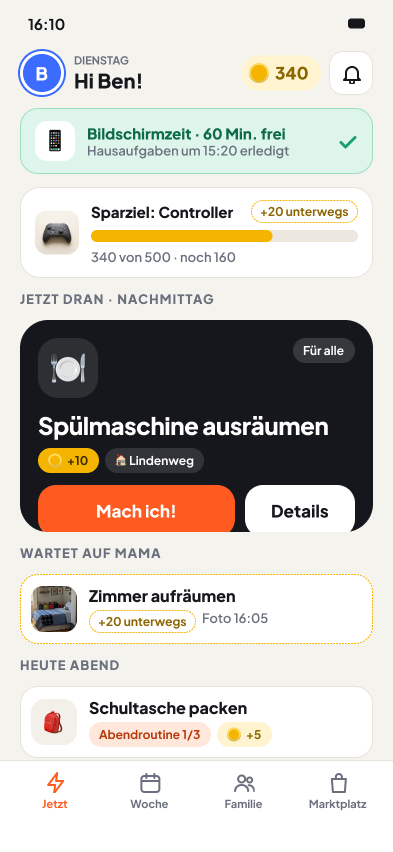
App view “Now” for a child: what's up next, coins and screen time
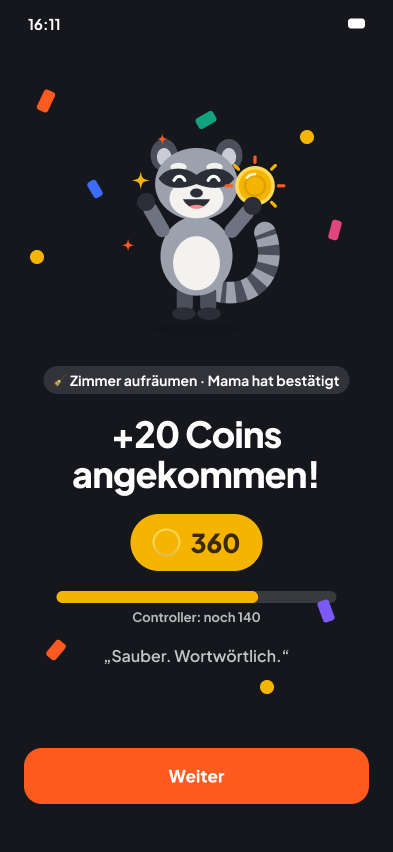
Celebration in the app: +20 coins arrived, Socks the raccoon cheers

Screens from development

ADHD-friendly

Built for kids with ADHD. Good for every kid.

What helps kids with ADHD helps every child: clear structure, one thing at a time and an instant reaction. That's why there's no ADHD mode and no label. Siblings use the same app, and nobody gets singled out.

  • When time is hard to feel

    Time blocks, not clock times

    Morning, After school, Evening. No countdowns, no ticking clocks.

  • When getting started is hard

    One thing, nice and big

    “Up next” shows just the next chore, broken into small steps.

  • When the order gets lost

    Routines lead the way

    The next chore appears as soon as the last one is done.

  • When the reward has to come now

    An instant reaction

    Socks celebrates the moment it's ticked off, and the coins show up straight away.

  • When setbacks hit hard

    Nothing breaks, nobody tells off

    No streaks, no punishments, no red warnings.

  • When parents have ADHD too

    Less to keep in your head

    Templates instead of set-up. The app does the reminding, not you.

Choreaction is a family planner, not a medical device. It doesn't replace a diagnosis or therapy.

Roadmap

Where we are right now.

  1. We are here Now

    Development

    We're building the app, the family display and the website. This page shows what's planned.

  2. Next

    Public beta

    Families try Choreaction in everyday life. Your feedback decides what we change before launch.

  3. After that

    Launch

    Choreaction arrives on the App Store and Google Play. One subscription for the whole family, free for 14 days.

Features

What Choreaction will do.

A detailed look at everything planned for the public beta. Some details may still change before then.

01 The weekly plan

Like a school timetable, just for home.

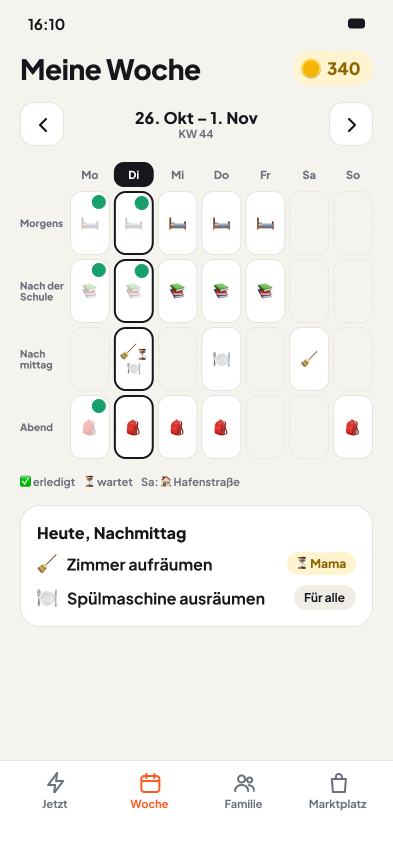
Grown-ups plan recurring chores in time blocks: Morning, After school, Afternoon, Evening. Kids see the same grid, only simpler.

  • “Up next” instead of a list: kids see what's on right now in big letters, with the next two or three chores below.
  • “Today” for parents: open, done, waiting for approval. Filter by child and home.
  • Repeats without maths: daily, on weekdays, every other week, monthly or just once.
  • Ready to print: the weekly plan as a PDF for the fridge, per child or for everyone.
Two examples from family life
Weekly plan in the app, laid out like a school timetable
02 Chores and routines

Small steps, a clear goal.

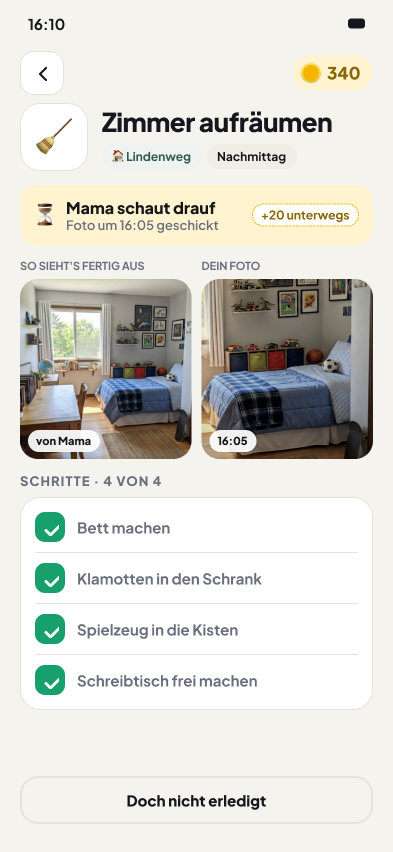
Every chore can have steps and a reference photo. Several chores become a routine that leads the way, step by step.

  • Steps: a checklist per chore, so “tidy your room” doesn't feel so huge any more.
  • Reference photo: “This is what done looks like”. A photo says more than any instruction.
  • Routines: a bedtime routine or “Before school”. The next chore appears as soon as the last one is done.
  • Up for grabs: taking the bins out goes to whoever taps “I'll do it!” first, or it takes turns.
  • Suggestions and templates: kids suggest chores, grown-ups approve them. Ready-made templates by age for a quick start.
Two examples from family life
Chore “Tidy your room” with steps and a reference photo
03 Tick off and celebrate

Done. Socks reacts.

Ticking off takes one tap. Then it's time to celebrate, not to check up. If something doesn't get done, there are no coins for it, and that's all.

  • One tap is enough, even offline. Ticked off by mistake? Just undo it.
  • Check it your way: trust, photo proof or a grown-up's approval, set per chore.
  • Celebration style: confetti, balloons, fireworks or no animation at all. Everyone picks their own.
  • Combos, not streaks: several chores in a row count up. There are no daily streaks that can break.
  • Socks the raccoon celebrates along. He's never disappointed and never tells anyone off.
Two examples from family life
Celebration in the app: +20 coins arrived, Socks the raccoon cheers
04 Marketplace

Your rewards, your prices.

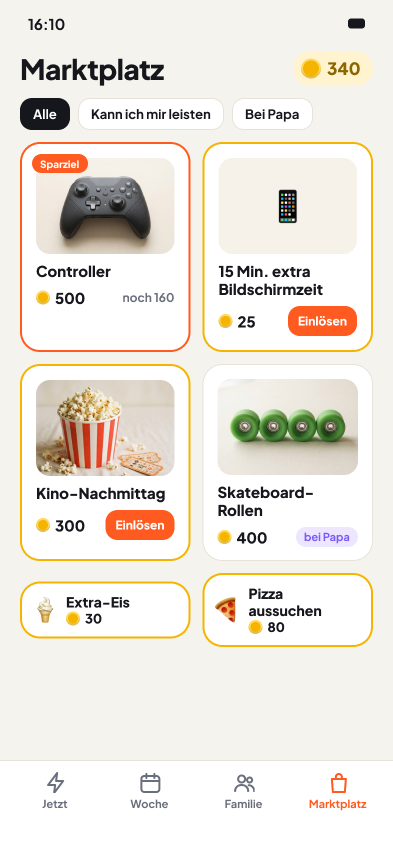
Kids swap their coins for rewards you choose. Time together never costs anything, rewards are the extra on top.

  • You create them: film night, ice cream, 30 minutes on the console. The marketplace only shows what you put in.
  • They redeem them: kids redeem on their own. You see it in your inbox and tick it off once it's done.
  • Wish list and savings goal: kids wish for something, you set the price. A pinned goal shows “120 coins to go”.
  • Prices with a feel for it: the app estimates how long a child will save, for example “Cinema ≈ 3 weeks”.
  • No real money: coins are your family currency. No products, no ads.
Two examples from family life
The family marketplace with rewards the parents created
05 First X, then Y

Homework first, then screen time.

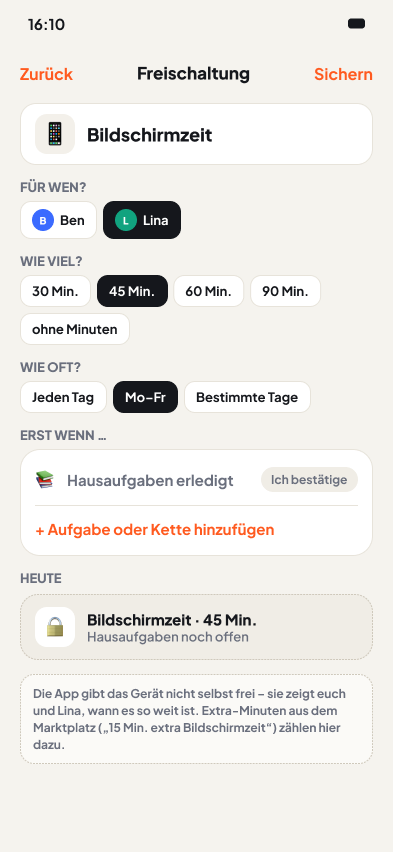
Unlocks make your rules visible. They don't cost coins and apply for the rest of the day once the condition is met.

  • Locked until it fits: an unlock turns green once the linked chores are done.
  • Visible to everyone: child, parents and the family display can see whether screen time is unlocked today.
  • Extra minutes: are available in the marketplace for coins, for example “60 + 15 min today”.
  • No countdown: the app doesn't lock any device. You decide what “unlocked” means.
Two examples from family life
Setting up an unlock: screen time after homework
06 Family display

One tablet on the fridge for everyone.

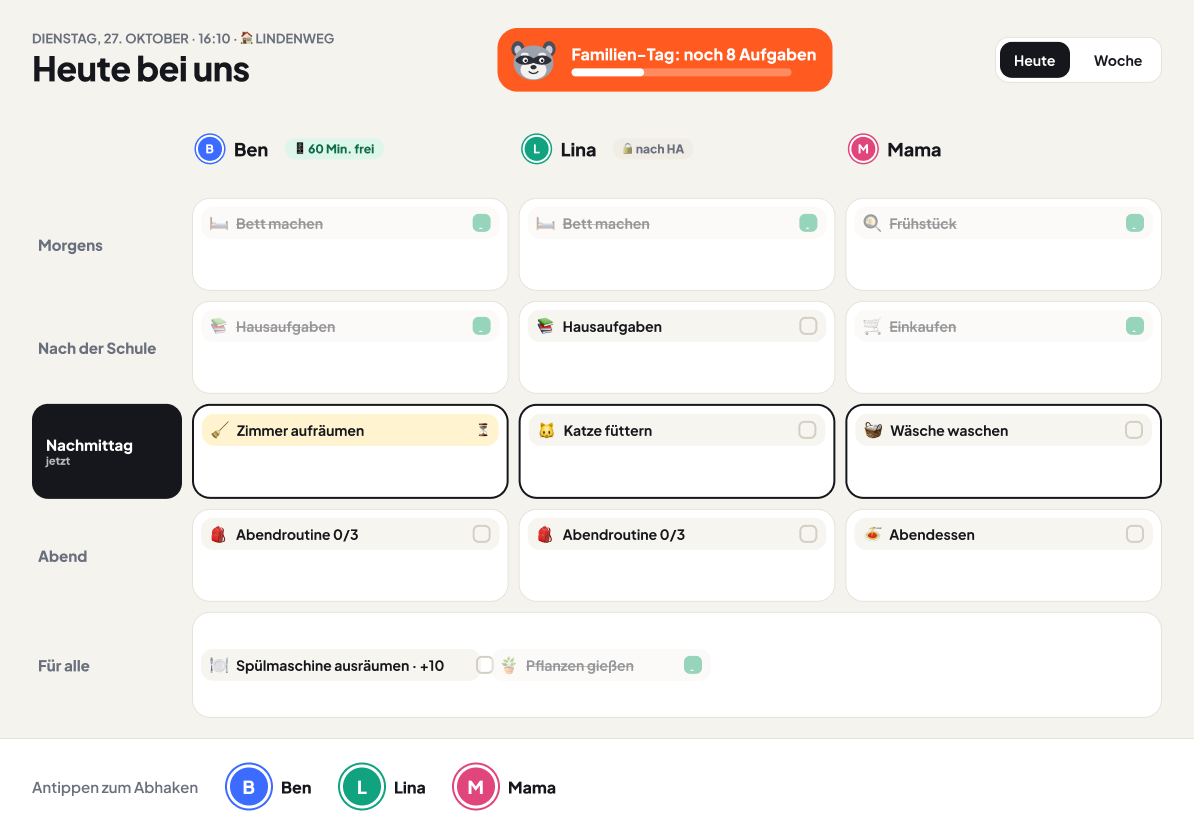
An old tablet becomes your shared plan. It shows everyone's day, without balances and without settings.

  • Tick off with one tap: kids without their own phone tap their avatar and tick it off. A PIN can protect a profile if you like.
  • Quick sign-in: grown-ups approve photos and rewards with their PIN right on the display.
  • Planning stays in the app: nothing can be changed on the display.
Two examples from family life
Family display on a tablet: everyone's day at a glance

And also

07

Coins and bonuses

  • Your own name and symbol for your currency
  • One wallet per child, with a history of every entry
  • Bonuses like Family day, Chain complete, Helping hand
  • A hint at how much a child can earn per week
08

One home or two

  • Built for the everyday family
  • More than one home possible, e.g. shared custody
  • Kids' wallet and plan work everywhere
  • Visibility between homes with one switch
09

For grown-ups

  • Inbox for approvals, suggestions and rewards
  • Turn notifications on or off per event
  • Push notifications for kids are off until you turn them on
  • Grown-ups do chores too, without coins
10

Devices and sign-in

  • Grown-ups: email, Apple or Google
  • Kids don't need an account, they pair with a QR code
  • Several profiles on one device
  • Sign devices out remotely
11

Website

  • View the family plan and print it as a PDF
  • Invite other grown-ups
  • Start and manage your subscription
  • Export your data or delete your family
12

Privacy

  • Kids only with a nickname, avatar and colour
  • Only grown-ups see proof photos, and they're deleted automatically
  • No ads, no tracking
  • Servers in the EU
After launch

What we'd like to add next.

These ideas are already part of the concept. Your feedback from the beta decides which come first.

  • AI suggests steps
  • Photo tips from AI
  • Screen Time and Family Link integration
  • Phone widgets
  • Daily summary
  • Edit chores on the website
  • Blended families
  • An API for other apps
FAQ

Good to know.

When does the beta start?

As soon as the app, the family display and the website run reliably in everyday life. We'll only name a date once we can keep it. If you sign up, you'll hear first.

What happens to my email address?

We'll only write to you when the beta starts and at launch. You confirm your sign-up by email and can unsubscribe at any time with one click. No newsletter, no sharing.

Can any family join the beta?

Yes, the public beta is open. We'll send the link to everyone who signed up here.

Which devices does Choreaction run on?

iPhone and iPad, Android phones and tablets. Grown-ups can also view and print the family plan on the website.

How much will Choreaction cost?

We're planning one subscription for the whole family: £6.99 a month or £49.99 a year, free for 14 days. At launch there's also “Family for life” for 500 founding families.

Is Choreaction only for kids with ADHD?

No. ADHD-friendly means clear structure, no timers and instant feedback. Every child benefits from that, and plenty of parents do too.

Be there when it starts.

Families on the list are the first to hear about the beta and the founders' offer “Family for life”.